EDGE Local Inference
EDGE Local Inference runs camera detection on a computer you own instead of in the cloud. The camera sends a snapshot to a small gateway on your network, the gateway asks a local model for a result, and the result comes back to the camera. No frame leaves your network.
Who this is for
You need an active paid Hosted EDGE license purchased through Google Cloud Marketplace. Local inference is a mode inside that product, not a separate one.
Free EDGE and sponsored trials do not qualify. If your camera is running under Free EDGE, or a sponsored trial of any kind, Local inference stays off regardless of configuration. This is enforced at request time against your verified Marketplace entitlement, not against a saved setting.
What it costs
- Your Hosted EDGE device-hour charge still accrues. Local inference does not change your device billing.
- AI units for frames processed locally are $0. You are not billed cloud inference tokens for Local detections.
- You provide and pay for the computer that runs the model. Anava does not host or manage it.
See anava.ai/pricing for current plan details.
What it is not
- It is not a way to run EDGE detection without a paid license.
- It is not a hosted or managed service. Anava does not operate your gateway or your model.
- It has no cloud fallback. If the local gateway is unreachable, detection fails locally; the camera does not silently switch to cloud inference.
- It is not guaranteed hardware-agnostic performance. Measured latency depends on your machine. See Requirements and Operate.
Architecture
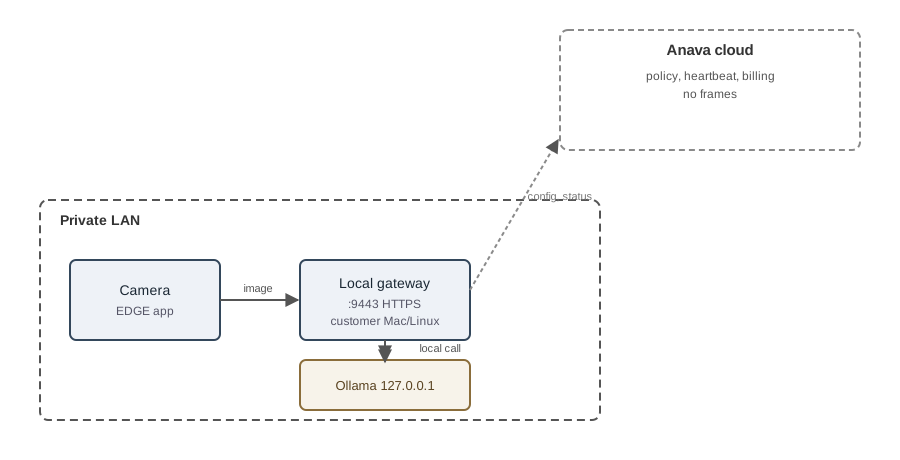
The camera and the gateway communicate over your private LAN on TCP 9443. The gateway calls Ollama on 127.0.0.1 on the same machine. Anava's cloud services see policy checks, heartbeat, and billing signals only. They never see camera frames or inference content.
How it works, in order
- You confirm your Hosted EDGE license is paid and active.
- You install the local gateway on a Mac or Linux machine on the same network as the camera. See Requirements, Install on Mac, and Install on Linux.
- You import a connection file into the camera. See Connect the camera.
- You test the connection, then run a real sample, before arming detection. See Operate.
Next steps
- Requirements
- Install on Mac
- Install on Linux
- Connect the camera
- Operate
- Troubleshooting
- Security
- Rollback
Related: anava.ai/edge · anava.ai/edge/local · anava.ai/pricing